Safety first: the safety pack and the gate
What has to be signed before a risky job starts and before it closes, who signs each piece, and the order that stops you getting stuck.
Warm-up, from memory: (1) In Lesson 2, why was Tariq's Start Work button grey? (2) In Lesson 3, which button do you press on a P1 safety alarm that needs a crew?
One job carries this whole lesson: WO-2026-1013, the arc-fault trip on combiner box CB-04 (feeding inverter INV-003), raised from an alarm in Lesson 3 as an Emergency job at critical priority. After its three approvals, on 15 October 2026 it was taken through every safety step in the training copy of the app by Sara (supervisor, who raised it), Tariq (technician), Paul (plant manager), Carla (corporate) and Adam (admin). Messages in quotation marks are the app's own words.The photographs attached to the permit were labelled training images, not real site photos.
1 · The safety pack
When a job that carries risk is created, the app builds a draft safety pack for it at once: a job hazard analysis, a risk assessment, a toolbox talk and, for high-risk work, a permit to work. Nothing in the pack is finished. People have to complete and sign each piece. The safety gate checks the pack whenever someone tries to start, complete or close the job.
| Item | Who | Counts as done when | Where |
|---|---|---|---|
| JHA (job hazard analysis) | Technician submits; plant, corporate or admin approves | Approved | HSE Center → JHA |
| Risk assessment | Plant, corporate or admin | Mitigated or accepted | HSE Center → JHA → risk assessments |
| Toolbox talk | Supervisor | Recorded with attendees, or a signed acknowledgement | HSE Center → Toolbox |
| Permit to work | Five people (section 3) | Approved and in date to start; closed before the job can close | Safety Permits |
| Permit photos | Anyone on the job | One photo for each of five controls | The permit |
| LOTO (if one is linked) | Two people (section 4) | Active to start; removed before closing | LOTO register |
| Pre-start confirmations | The assigned technician | All four ticked: PPE, toolbox talk, isolation, calibrated test equipment | Start Work |
For WO-2026-1013 the gate at first listed five open items, in plain words: “The job hazard analysis still needs approval; The permit to work still needs approval; The risk assessment still needs review; Hold the toolbox talk and record who attended; Pre-start verification: confirm PPE, toolbox talk, isolation and test equipment when you start the job”.
2 · Read the draft JHA before anyone approves it
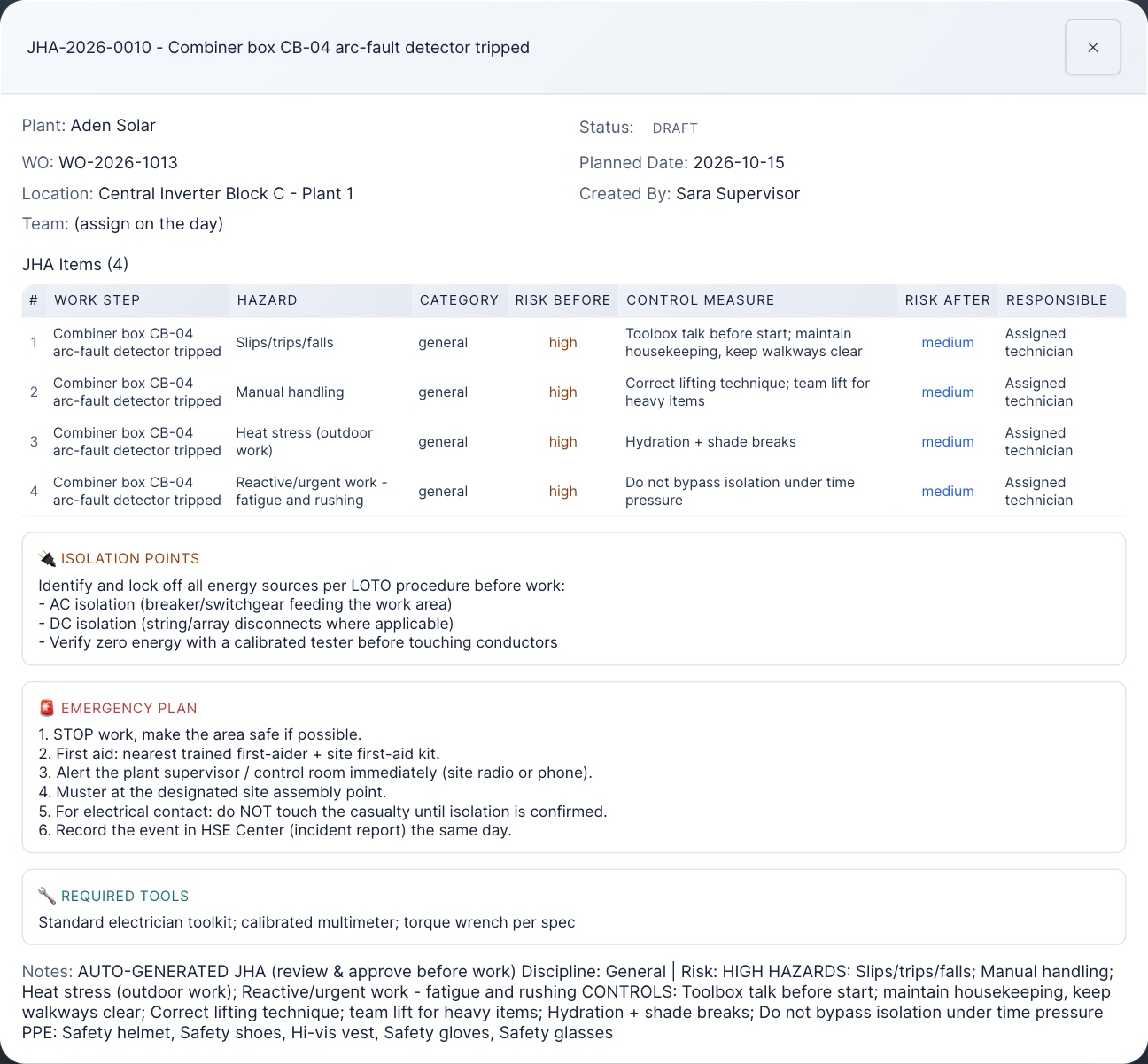
- Technicians: read the hazards before you submit. If the main hazard is missing, say so to your supervisor, and write the missing hazards and controls on the signed paper JSA sheet that you photograph for the permit.
- Approvers: do not approve a JHA the technician has not submitted, or one that misses the hazard the job is about. Tell your HSE officer.
On WO-2026-1013, Tariq submitted the JHA and Paul approved it. When Tariq tried to approve it himself, the app refused: approving is plant level and above.
3 · The permit to work: five people
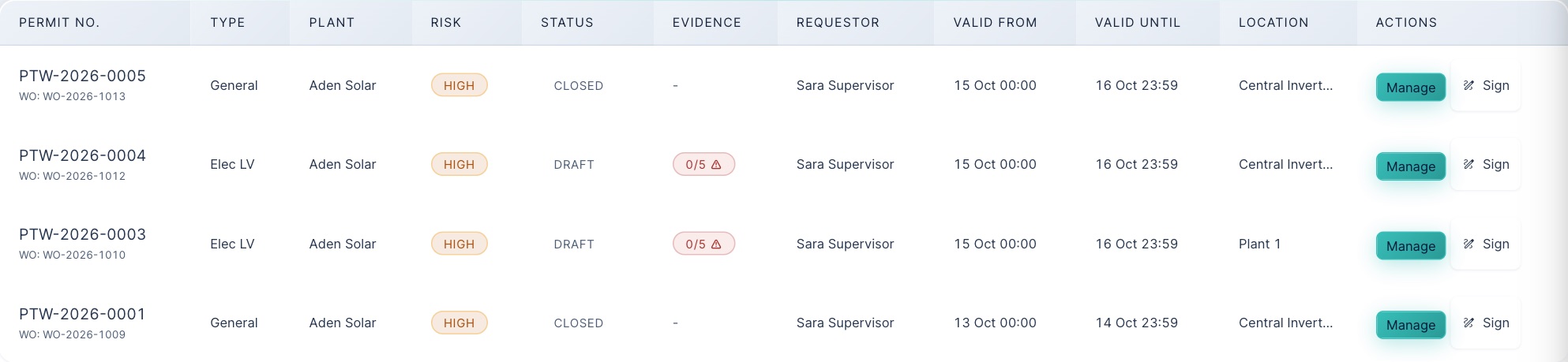
A permit goes draft → signed → approved → active → closed, and it needs five different people:
| Role on the permit | Who may hold it | On WO-2026-1013 |
|---|---|---|
| Requestor | Whoever raised it | Sara |
| HSE signature | Plant, corporate or admin | Carla |
| Area owner signature | Plant or admin | Paul |
| Supervisor signature | Plant, site or admin | Tariq |
| Approver | Plant, corporate or admin, and none of the four above | Adam |
When Sara tried to sign as supervisor: “The permit requestor cannot also sign as HSE, Area Owner or Supervisor (separation of duties).” When Paul, who had signed as area owner, tried to approve (after the photos were on; before that the photo refusal comes first): “the approver must be someone other than the requestor and the three people who signed it … 3 other authorised approvers are available on this plant - ask one of them to approve it.” At a small plant where every supervisor has already signed, a corporate or fleet approver can approve.
What approval and activation need
- To approve: the three signatures; the approver's four ticks (JHA complete, isolation plan adequate, team competent, PPE available); and photos of the signed JSA, HIRA (hazard and risk sheet) and toolbox talk sheet. Without the photos: “PERMIT REFUSED - photo evidence missing … JSA; HIRA; TBT”.
- To activate (the moment work is authorised): the JHA approved; two more photos, of the locks and tags in place and the tools and test equipment; and, for high-risk permits, the activation checks (JSA reviewed, PPE, LOTO, certificates). The person activating ticks these on the Safety Permits screen at that moment; ticking only JSA: “Not confirmed: arc flash PPE verified, LOTO applied, certifications verified.” With all ticked: “Permit PTW-2026-0005 is active. Work may start.” A permit with no end time cannot be activated.
- Each photo must be different. Reusing the JSA photo as the LOTO photo: “That is the same photograph already attached as JSA evidence on this permit. Each hazard category needs its own photograph of that control.”
- Mind the dates. A permit is only good between its valid from and valid until. Once it expires the gate says “The permit ran out on …” and the job cannot restart until the permit is extended or a new one is raised. Extending needs a reason and a new end time later than the current one.
4 · LOTO: two people, every time
Lockout tagout is recorded in the LOTO register, linked to the job. The rule is that one person never isolates, proves and releases on their own:
- Fit the locks and record each isolation point with its lock and tag numbers, and who fitted them. Sara filed LOTO-2026-0102 (CB-04 DC isolator, INV-003 DC input 2) and named Tariq as the fitter. Status: pending verification. Both the person who files the form and the person who fits the lock count as “the installer” from now on.
- A third person proves zero energy, with a test reading for every point. Tariq: “You fitted this lock, so a second person must verify zero energy (two-person rule).” Sara, who filed it: “Zero-energy verification must be performed by a different person from the lock installer.” Paul with one reading blank: “All isolation points must be confirmed with a test reading”. Paul with both readings: “LOTO-2026-0102 is now ACTIVE (2 points confirmed)”.
- At the end, someone else removes the locks, with a verifier who is neither the fitter nor the filer. Tariq: “you fitted this lock, so you cannot remove it yourself. A colleague at this plant must remove it, or a plant manager can clear it by emergency removal.” Paul removed them with Carla as verifier. In a genuine emergency a plant manager of that plant, or a corporate or admin user, can authorise an emergency removal; corporate and admin are told at once.
5 · Start, finish and close, in this order
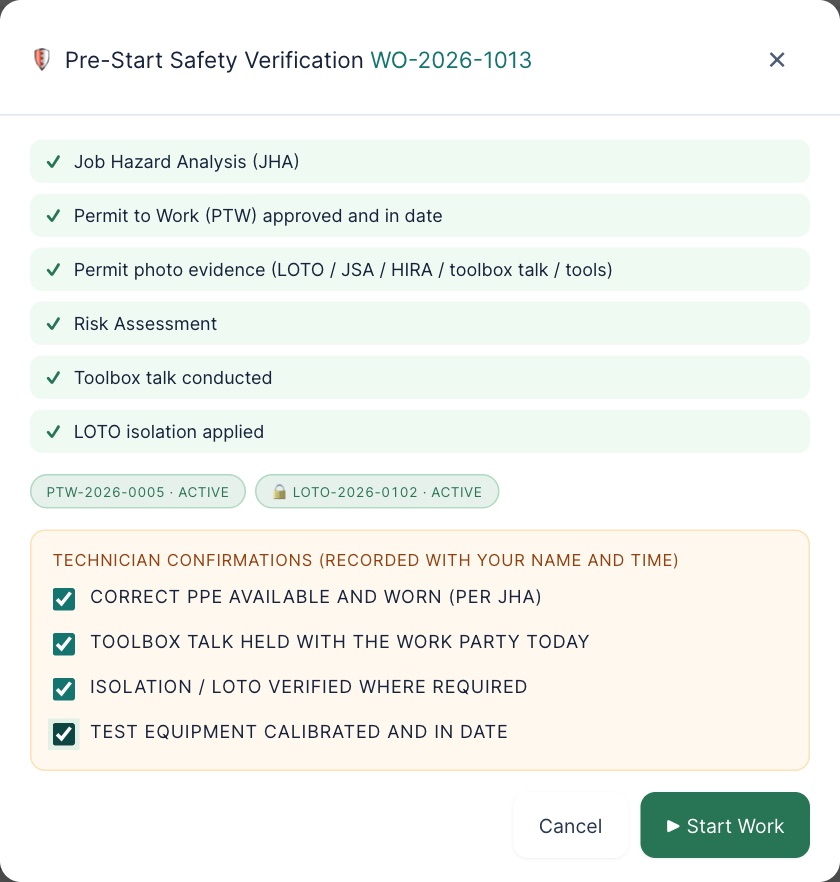
After the work, the order matters, because each step is refused until the one before it is done:
- Complete (technician): every checklist step answered, then the four completion statements and notes. Corrective jobs also need downtime hours (“Enter 0 if the fault caused no production loss”).
- Verify (plant level): corrective jobs need a failure code, a cause code and a remedy code.
- Remove the locks (a second person). A permit cannot close while they are on: “Cannot close permit - LOTO is still active. Remove all isolations first.”
- Close the permit, with closure notes (“Closure notes are required”).
- Close the work order. Trying it with the permit and locks still live: “Close the permit before closing the job; Remove the locks and close the isolation before closing the job.”
6 · The emergency override
There is an emergency override, built so it cannot happen quietly. A corporate or admin user can let one step (start, complete or close) through a blocked gate, from the Authorise emergency override button in the work order's detail. The rules, all tested:
- Plant and site users cannot grant one: “Only a corporate or administrator account may authorise an emergency safety override. Escalate to your HSE manager.”
- A written reason of at least 40 characters, stating the emergency, the controls in place and who accepted the risk. “Urgent, please” was refused.
- Never by the technician assigned to the job, and only when the gate is actually blocking: “This work order already passes the safety gate for this step. No override is needed.”
- It lasts 4 hours unless set shorter, never more than 8 (a 24-hour request was cut to 8). It is used up by one step, and it can be revoked (“Override revoked. The safety gate is closed again.”).
- The Start Work button stays grey even with an override in place; the step goes through when the start or completion is sent from the work order.
- It is recorded permanently, with what was overridden, and HSE and management are notified.
It is for a real emergency (a fire pump at 3 a.m.), not for a permit nobody has got round to signing.
7 · Practice
Allowed or refused?
All ten were tried in the training copy.
Put the permit's life in order
Put the end of the job in order
From memory: (1) Name the five people a permit needs, and the one rule about who may approve. (2) Which two photos are added just before activation, and why not earlier? (3) The drafted JHA for an electrical job lists only slips and heat stress. What do you do?
Your part, by role
| You are | You do |
|---|---|
| field Technician | Read and submit the JHA. Sign the permit's supervisor slot if asked (not your own permit). Take the five photos. Fit locks; never prove or remove your own. Tick the pre-start and completion statements only when true. |
| plant Supervisor, plant manager, HSE | Approve JHAs that cover the real hazard. Mitigate risk assessments. Record toolbox talks with attendees. Sign permit slots; approve permits you did not sign. Prove zero energy and remove locks as the second person. |
| corporate | Sign the HSE slot or approve permits where a plant has no free approver. Grant an emergency override only for a real emergency. |
| admin | Any slot or approval except where you already signed. Emergency overrides, with the same care. |
Reference: Safety card · Glossary · Previous: Lesson 3 · Next: Lesson 5, Field work on the phone