Planned maintenance
How the maintenance plan becomes work, how to do a planned task properly, why the compliance figure can lie, and how to hand over a shift.
Warm-up, from memory: (1) Which phone actions are kept with no signal, and which need one? (Lesson 5) (2) Who verifies a job, and what may they never verify? (Lesson 2)
Everything below was done on 15 and 16 October 2026 in the training copy at Aden Solar (re-checked on the current code on the 16th), by Sara (supervisor) and Tariq (technician). Messages in quotation marks are the app's own words.The training copy had no plan yet, so this is a plan generated from scratch, exactly as a new plant would see it.
1 · From plan to work
- Templates describe each task once: its steps, the expected result of each check, tools, spares and how often it is due.
- Generate Schedule (plant level) turns templates into dated tasks. Sara generated 30 days for Aden: “32 PM schedule entries generated successfully”.
- Release happens automatically, or a plant manager presses release. Due tasks are grouped into PM round work orders by frequency band (Daily; Routine, for weekly to monthly; Periodic, for quarterly to annual). Tariq trying it: “Permission denied”. Sara: “2 consolidated PM round WO(s) generated, 3 schedule(s) linked (max 3 rounds per plant per day)”.
- The rounds, numbered like WO-PM-20261015-1000, went straight to assigned, each to an available technician at the plant. Unlike the jobs in Lesson 2, a released PM round does not wait for approval.
2 · Read the planner
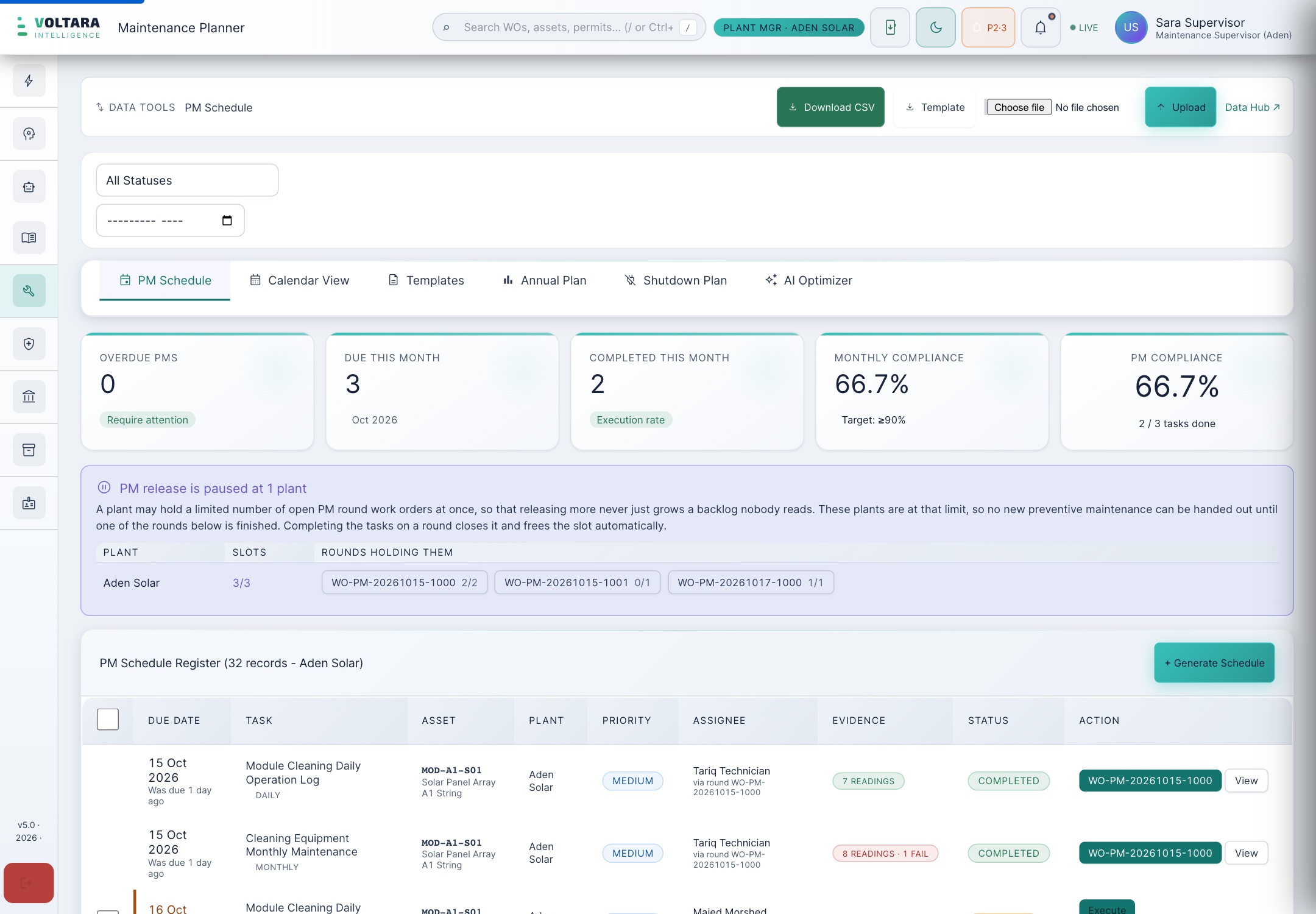
- Overdue, Due this month and Completed this month count tasks. Monthly compliance is completed over due, against a target of 90% or better.
- Evidence shows whether readings were recorded. A dash means none.
- Execute opens the task's card (section 3). Done is a shortcut for tasks with nothing to answer; on a task with required checks it is refused: “Answer the required checks before completing: Safety confirmed before starting… (+3 more)”. Use Execute.
3 · Do a planned task properly
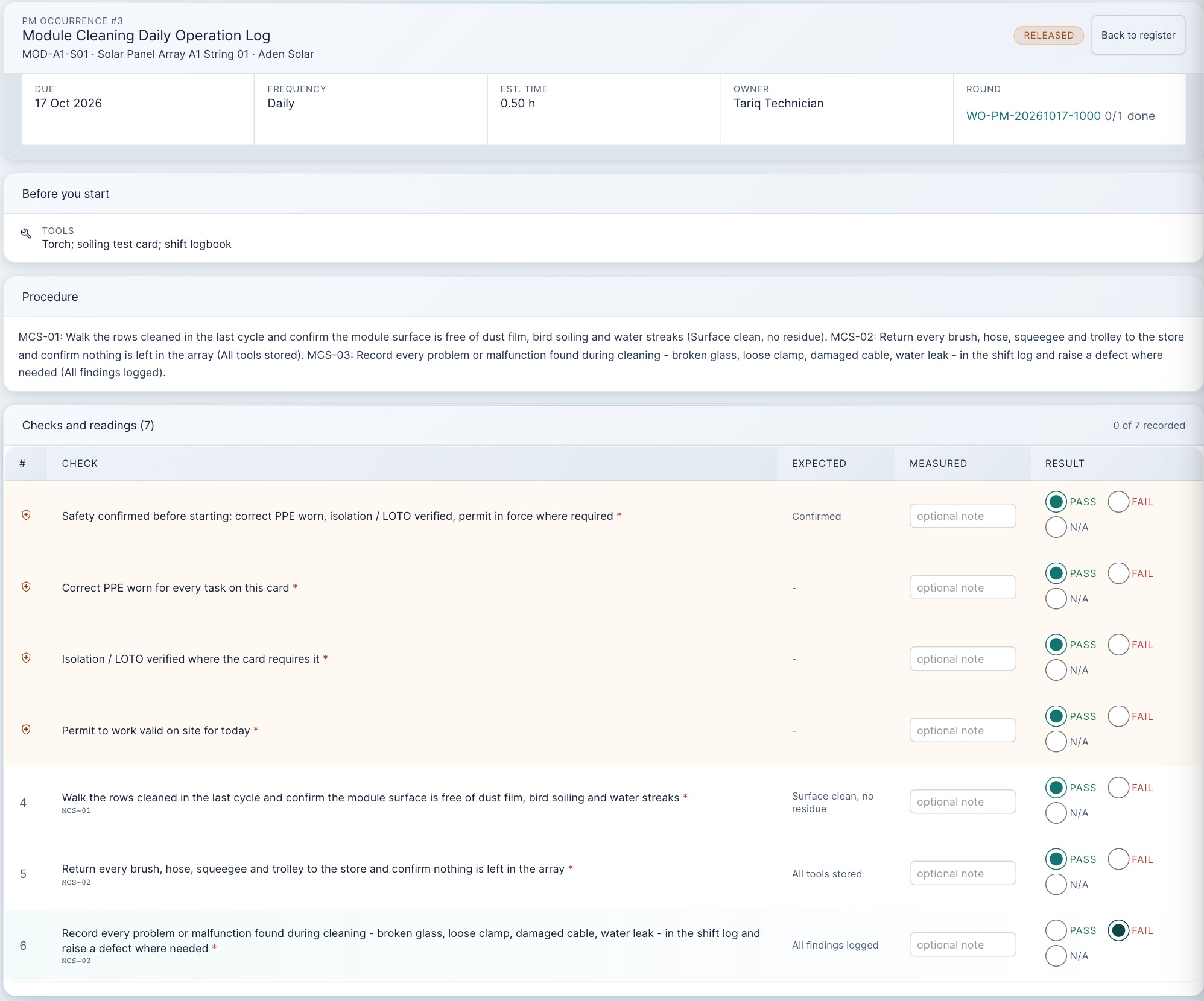
- Read Before you start (tools and spares) and the Procedure.
- Answer every check marked *: Pass, Fail or N/A. With nothing answered: “Answer the required checks before completing this PM.”
- Type the measured value wherever the check has a number. Tariq passed “TDS ≤ 50 ppm” with the box empty, and the app stored a pass with no reading. A pass with no number is not evidence.
- A failed check does not raise a job. Tariq failed one check and wrote the finding in the notes. The app recorded it (“8 readings recorded (1 failed check)”), and no work order was created. Raise the corrective job yourself (Lesson 2), and note it in the shift log.
- Complete this PM. When every task on the round is done, the round work order moves on.
- Technicians: clear the round's safety pack and press Start Work on the round before executing its tasks, as for any job (Lesson 4).
- Managers: read PM compliance next to the round's status. Completed tasks on a round still at assigned are a warning, not an achievement.
When a round is closed or cancelled
Tasks on a round that closes are marked completed, except tasks due more than a day later: those go back to the schedule for their own date. Tasks on a cancelled round also return to the schedule. A plant has at most three open automatic rounds. When all three are open the planner says so (“PM release is paused at 1 plant”) and no new preventive work is released. The banner says that completing a round's tasks frees its slot, but that only happens once the round itself can move on: on 16 October two of Aden's three rounds had every task done (2/2 and 1/1) and still held their slots, because their safety packs were open. Clear the round's safety pack and close it, or nothing new arrives.
Two newer controls: a supervisor can put a round on hold (its tasks are then refused: “This round is on hold. Ask your supervisor to release it.”), and a plant manager can mark missed rounds as skipped, with a reason (“Say why these rounds were missed.”), so they stop counting as overdue.
4 · The shift logbook
Maintenance Hub → Shift Logbook holds one handover per plant, per date, per shift (a second one is refused: “A shift log already exists for this shift”). The form has ten sections for what happened, what is still open and what the next shift must know. From reading the app's code:
- Site, plant, corporate and admin users can write a handover. Only plant level and above can acknowledge it, as the counter-signature.
- The outgoing and incoming names are typed on the same form by whoever submits it, and stamped with the same time. So the incoming person should type their own name, at the handover, in person.
- Write work order and permit numbers in full (for example WO-2026-1009, PTW-2026-0001), and log every failed PM check and defect you find.
5 · Practice
True or false?
Put the chain in order
From memory: (1) Monthly compliance reads 100% but a round is still at assigned. What do you suspect? (2) A check fails during a PM. What two things do you do? (3) Aden's planner says “PM release is paused” although every task on two rounds is done. Why, and what clears it?
Your part, by role
| You are | You do |
|---|---|
| field Technician | Start the round properly, then Execute each task: answer every check, type every number, and raise a job for any failure. Write the shift log; type your own name at handover. |
| plant Supervisor, plant manager | Keep the templates right, generate the schedule, release and reassign rounds. Check that compliance matches rounds that actually started. Acknowledge handovers. |
| corporate | Read PM compliance per plant next to round status and evidence, not on its own. |
| admin | Everything a plant manager can do, at every plant. |
Reference: PM card · Glossary · Previous: Lesson 5 · Next: Lesson 7, Assets, stores and buying