Reading the numbers
What the headline figures mean, where they come from, and five checks to run before you repeat one to anybody.
Warm-up, from memory: (1) What should you read on a dashboard before any number? (Lesson 1) (2) Monthly PM compliance reads 100% while a round is still at assigned. What does that tell you? (Lesson 6)
Everything below was done on 18 October 2026 in the training copy of the app, running the current code. The training copy has no live plant feed, so Sara entered Aden's daily figures for 1 to 15 October by hand, as a plant does when its feed is down, and Carla read them as a corporate user.The figures are realistic but invented for training: about 600 MWh a day from Aden's 120.4 MWp, PR around 82%. One day was given a wrong PR on purpose, to see what catches it.
1 · Where the numbers are
| Screen | What it is for |
|---|---|
| Command Center (corporate, admin) / Operations Dashboard (plant) | Today and month or year to date, at a glance. Click a tile to open its analysis. |
| SCADA Intelligence → Logbook | The daily figures themselves, one row per plant per day, with who entered them and their status. |
| Analytics and KPI Scorecard | Trends, losses, comparisons between plants. |
| Report Center | The daily generation report (DGR), monthly report and others, to print, save as PDF or email. Opening them needs corporate or admin: a plant user sees the cards but is refused. |
2 · The headline tiles, and what each really measures
 1
2
3
4
5
6
7
8
1
2
3
4
5
6
7
8
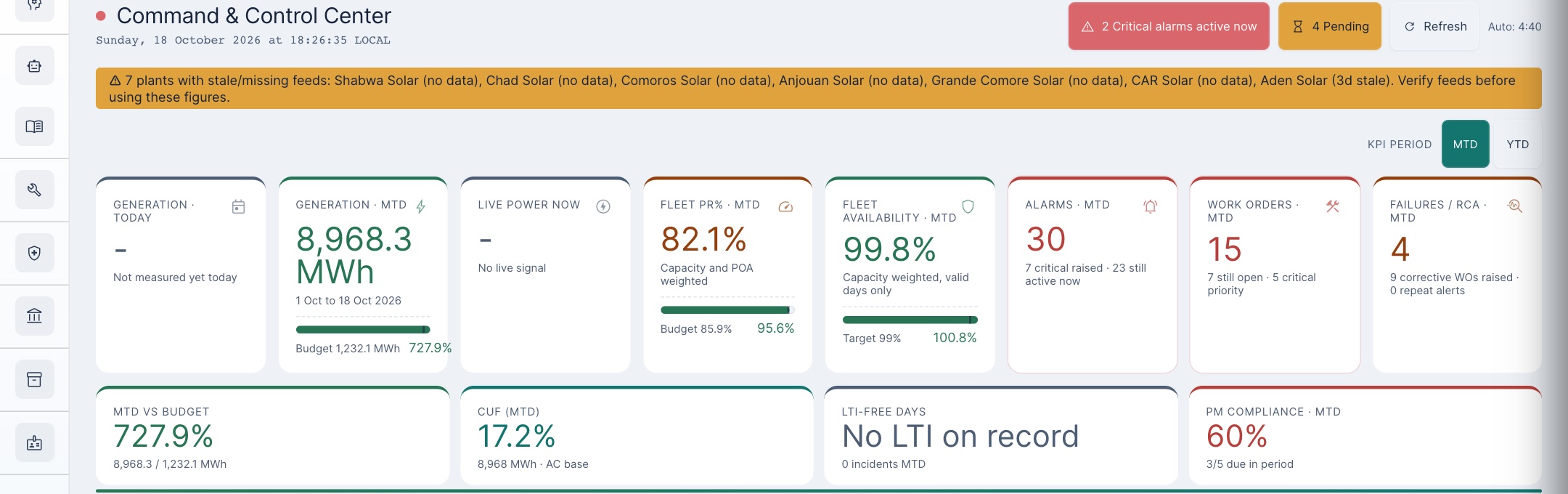
- 1Data banner. Plants whose feed is late (“3d stale”) or absent. Every total that includes them is incomplete.
- 2Period. MTD or YTD; every tile follows it.
- 3Generation. The sum of the daily rows. The label says “1 Oct to 18 Oct” even though Aden's data stops on the 15th.
- 4PR. The PR stored for each day, averaged by irradiance and plant size. It is not recalculated from energy.
- 5Availability. Capacity weighted, days with a valid reading only.
- 6MTD vs budget. 727.9%: Aden's energy divided by the budget of the only plant that has one (see the warning below).
- 7CUF. Energy over capacity × 24 h × every day so far, so missing days count as zero: 17.2% here, 20.7% over the days actually measured.
- 8PM compliance. Tasks marked done over tasks due (Lesson 6). Not proof the work was safe or started.
3 · Where a daily figure comes from
Every tile is built from one row per plant per day. The row arrives from the plant's feed, or a person types it into the Logbook. A typed row is stored exactly as typed: the app does not recalculate the PR from the energy, and it starts as pending approval.
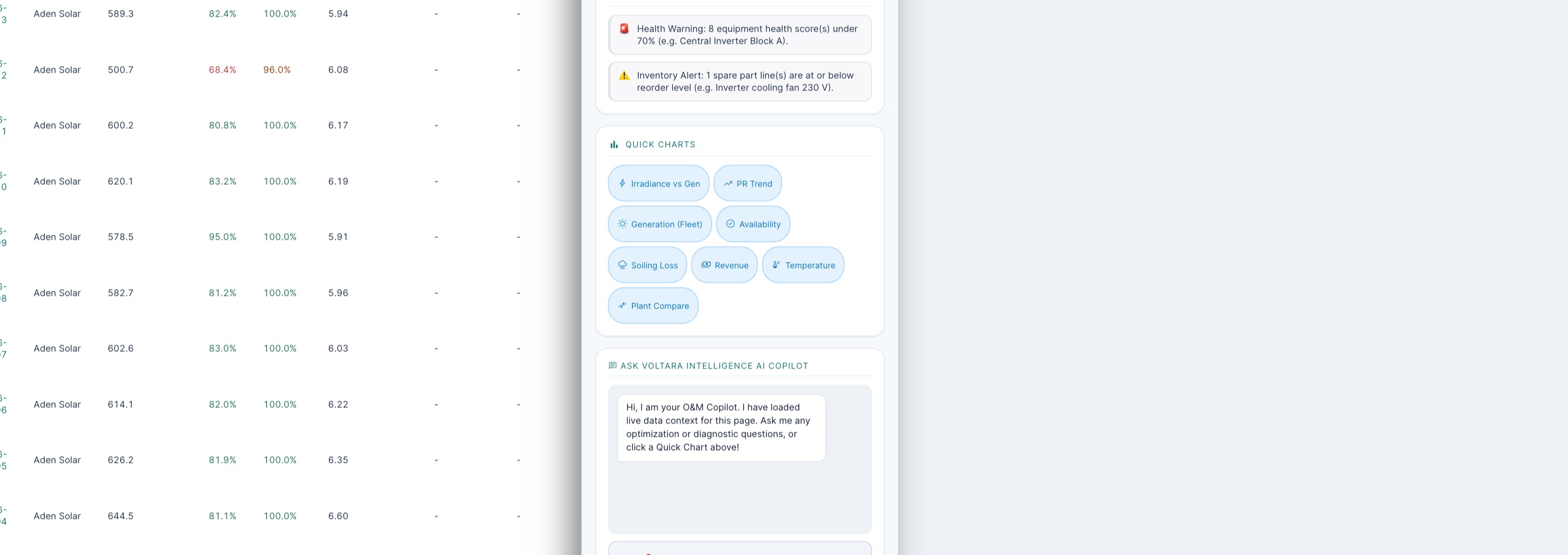
What we found when one day was typed wrong (PR 95% where the energy says 81%):The nightly data-quality job did classify the day as contradictory, but on a hand-typed day it is not allowed to store that verdict or raise an alert, so nothing anywhere shows it.
- It counted at once, before anyone approved it: Fleet PR read 82.1% instead of 81.2%, and revenue for the month was worked out from the typed energy.
- The nightly check did not remove or flag it.
- Anyone at the plant could approve it, including Sara, who typed it, and Tariq, a technician. Once approved, the daily report stops calling the day provisional and prints its 95% as a certified figure. This has been reported as a fault.
So the protection is you. The check takes a minute: PR = energy ÷ (capacity × irradiance), with energy in MWh, capacity in MWp and irradiance in kWh/m². If your answer and the typed PR differ by more than a point or two, one of the three numbers is wrong.
Check it yourself
4 · The daily report
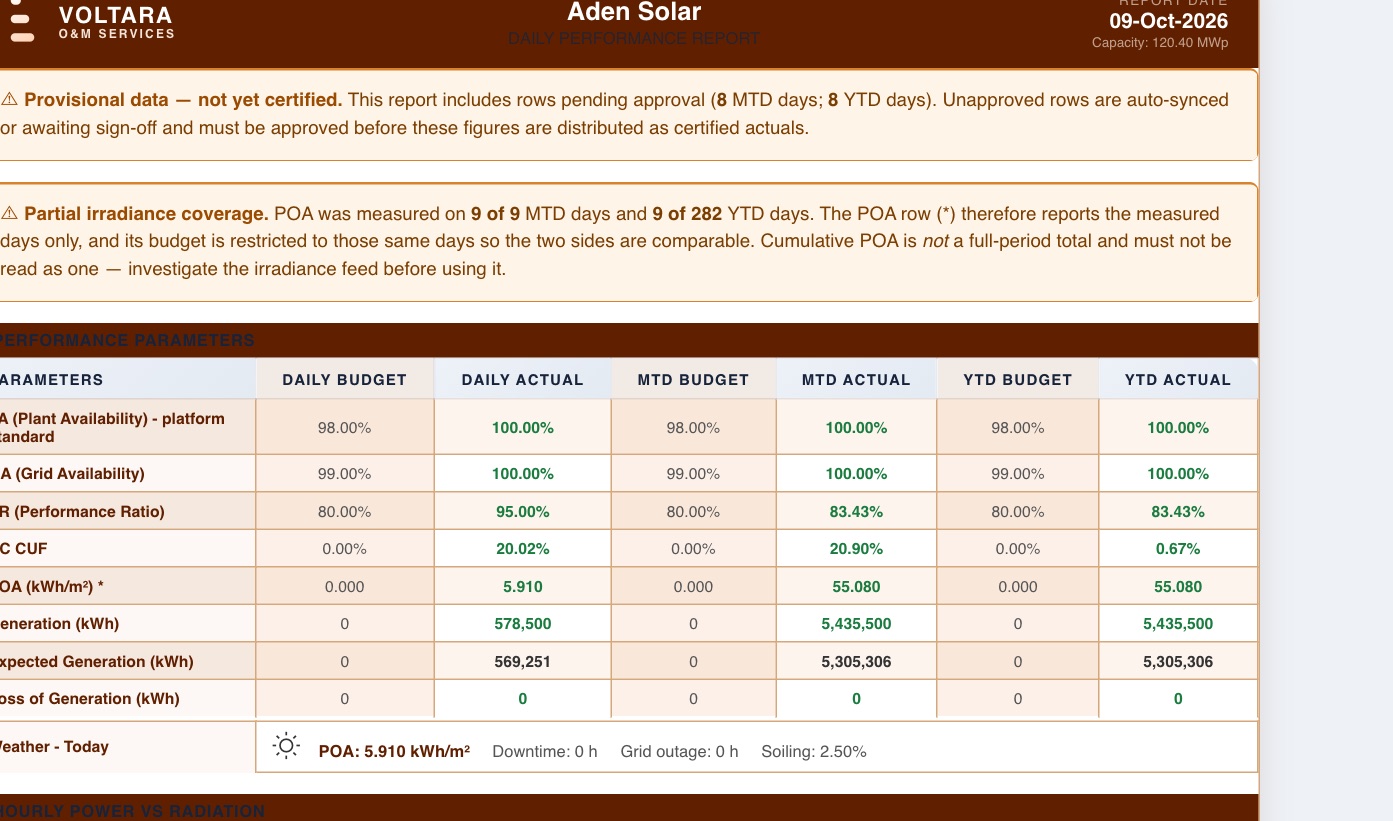
The banners are the report's own warnings: provisional means some days are unapproved, partial irradiance coverage means the PR and POA rows rest on fewer days than the period. Below the table, the Hourly Power vs Radiation chart is a standard bell shape scaled to the day's total, not hourly measurements, whatever the day.Its only label is a small note under the chart: “Estimated from daily SCADA total.”
5 · Five checks before you repeat a number
- Banner: are the plants in this figure up to date? A month total with three missing days is three days short.
- Coverage: how many days are actually measured? Tiles do not say; the daily report and the Logbook do.
- Source: feed or typed? Open the Logbook: typed rows show their notes and status, and a typed PR was never checked by the app.
- Arithmetic: recalculate PR from energy, capacity and irradiance for any day that looks too good or too bad.
- Comparison: a “versus budget” or “versus target” figure is only as good as its denominator: which plants and which days does it cover?
6 · Practice
Trust it, or check it first?
From memory: (1) Write the PR formula and its units. (2) Why can a CUF month-to-date read low in the middle of the month? (3) A colleague approved the daily figures they typed themselves. What changes on the daily report?
Your part, by role
| You are | You do |
|---|---|
| plant Supervisor, plant manager, SCADA engineer | When the feed is down, type the day in the Logbook with a note of where each figure came from. Recalculate PR before saving. Do not approve figures you typed. |
| corporate Performance engineer, managers | Approve daily figures only after the PR check. Read the banners and coverage before quoting a fleet figure; question any “versus budget” above about 120%. |
| admin | Keep plant capacities and budgets complete, so fleet comparisons have a denominator for every plant. |
Reference: Numbers card · Glossary · Previous: Lesson 7 · Next: Lesson 9, Voltara Agents and the AI assistant